For students.
Stay on top of your grades, spot missing work and zeros, and know what needs your attention—all from your phone.
For students keeping up with school and parents or guardians supporting them. Check grades, missing work, and attendance from your phone, using your own student or guardian HAC account.
iPhone & Android · No app store download needed.
Built for Denton ISD students, parents, and guardians.
Students can see where they stand. Parents and guardians can stay involved, with a clear view of each linked student’s school information.
Stay on top of your grades, spot missing work and zeros, and know what needs your attention—all from your phone.
Use your own guardian HAC account to check your child’s grades, assignments, and attendance. See where support may help.
Switch between the students linked to your guardian HAC account. Keep each child’s school information within easy reach.
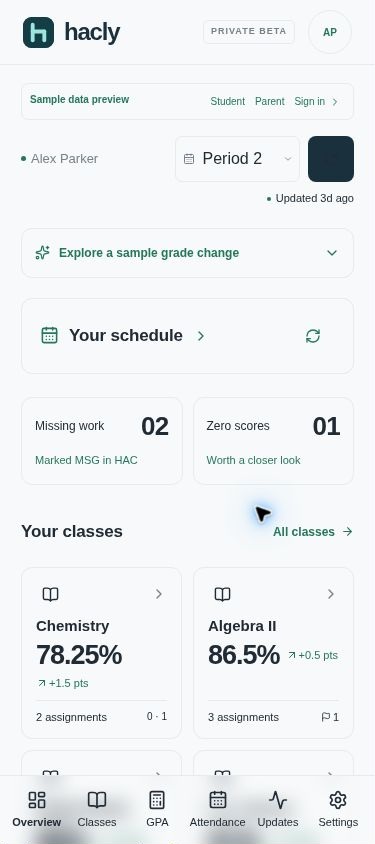
See Hacly at phone width. Readable cards, simple filters, and navigation within easy reach—without squeezing a desktop page onto your screen.
Students can check their own progress. Parents and guardians can choose a linked student, review course averages, and open a class for the details.
View full-size screenshot ↗Hacly’s real responsive interface, shown at phone width with fictional sample data.
Students can check between classes. Parents and guardians can catch up on their child’s progress whenever it fits their day.
Add Hacly to your home screen. Find the instructions in Settings.
iPhone, Android, tablet, or computer. Sign in with your own student or guardian HAC account.
Open it in Safari on iPhone or your Android browser. It also works on tablets and computers.
Students: use your student HAC account. Parents and guardians: use your own guardian HAC account—no need to use your child’s login.
Students see their own school information. Parents and guardians can choose any student linked to their HAC account and switch between them.
Hacly is for students, parents, and guardians using Denton ISD’s Home Access Center. Students sign in with their student account. Parents and guardians sign in with their own guardian account and can switch between linked students.
Yes. Sign in with your existing guardian HAC credentials. Hacly shows the students linked to that account, so you can choose a child and switch between them without separate logins.
No app store download is needed. Hacly opens in your phone’s browser on iPhone or Android. You can also add it to your home screen for quick access, using the instructions in Hacly’s Settings. An internet connection is required for school records.
No. Hacly provides read-only access to your school information. Your school’s Home Access Center remains the source for official records.
Hacly is an independent companion for Home Access Center. It is not affiliated with or endorsed by Denton ISD or the Home Access Center provider.
For students, parents, and guardians. Your next check-in starts here.